Every trading day starts with the same problem. There are thousands of listed stocks, yet only a handful will move enough to trade. Picking the wrong ones wastes time, capital, and focus.
That is exactly why stock screener criteria for day trading matter so much. A good screen narrows the market down to stocks with real volume, clean volatility, and a reason to move. A poor screen, on the other hand, fills your watchlist with noise.
Over the years, I have watched traders spend hours perfecting entries while ignoring what they trade. In practice, the list usually matters more than the trigger. A strong setup on a thin, slow stock rarely pays.
This guide walks through the filters and settings that work inside TradingView. You will learn which criteria to use, what values make sense, and how to build a stock screen that fits your style. Moreover, you will see the mistakes that quietly ruin most screens.
What a Day Trading Stock Screener Actually Does
A day trading stock screener is a filter. It scans the whole market and returns only the stocks that meet your rules. Instead of flipping through hundreds of charts, you start with a short, focused list.
TradingView's screener works the same way. You choose a market, add filters, and the tool updates the results. You can also add columns, sort by any metric, and save your setup for later.
However, a screener does not find trades for you. It finds candidates. The real job is still yours: reading the chart, judging the setup, and managing risk. Think of the screener as the net, not the fisherman.
For day traders, that net needs a specific shape. Intraday moves demand liquidity, range, and attention from other traders. As a result, those three needs form the backbone of any sound stock screener criteria for day trading.
Core Stock Screener Criteria for Day Trading
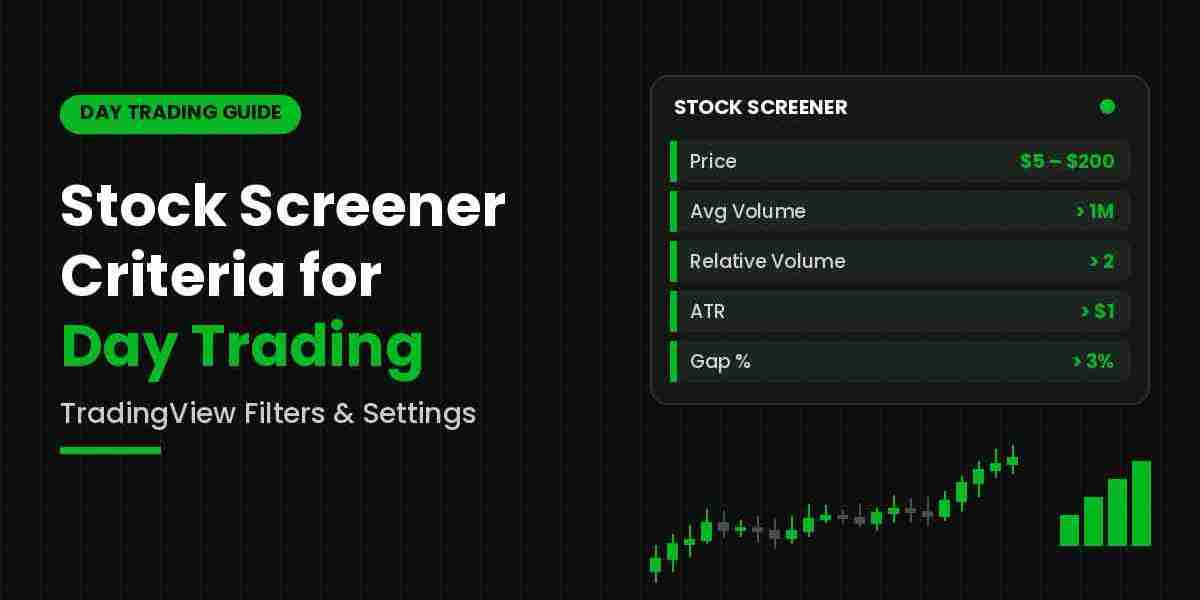
Most effective screens rest on six filters. Each one removes a different kind of bad candidate. Together, they form a reliable foundation for intraday work.
1. Price
Price sets the type of stock you trade. Many day traders use a range of roughly $5 to $200. Below $5, spreads widen and the risk of erratic moves grows. Above $200, position sizing becomes harder for smaller accounts.
That said, adjust the range to your capital. A larger account can handle higher-priced names with ease.
2. Average Volume
Volume is non-negotiable. A stock must trade enough shares for you to get in and out without heavy slippage. A common starting point is an average daily volume above 1 million shares.
For active scalping, some traders raise this to 2 million or more. Thin stocks may look tempting on a chart. Still, they can trap you when buyers or sellers suddenly disappear.
3. Relative Volume
Relative volume compares today's activity with normal activity. A reading of 2 means the stock is trading twice its usual volume. In TradingView, you will find it listed as Relative Volume, along with a time-adjusted version.
This filter is arguably the most important one on the list. Unusual volume signals that something has changed. Often, it points to news, earnings, or a strong sector move. A threshold of 1.5 to 2 works well for most screens.
4. Volatility and ATR
Day traders need range. Without movement, there is no profit potential. Average True Range (ATR) shows how much a stock typically moves in a session.
A useful rule is an ATR of at least $0.50 to $1. Alternatively, you can use the Volatility filter as a percentage. A daily volatility above 2 to 3 percent tends to suit intraday strategies.
5. Percentage Change and Gap
Stocks that are already moving often keep moving. Therefore, filter for a daily change of more than 2 to 3 percent, either up or down. For morning screens, the Gap % or Pre-market Change % filter is even more useful.
A gap of 3 percent or more shows that the stock opened with fresh interest. These names often deliver the cleanest early-session setups.
6. Market Cap and Float
Market cap and float shape how a stock behaves. Large caps move steadily and respect technical levels. Small caps with a low float, however, can swing violently on little volume.
Neither choice is wrong. Instead, match this filter to your risk tolerance. Newer traders usually do better with mid and large caps above $300 million.
Technical Filters Worth Adding in TradingView
Once the core filters are set, technical filters sharpen the list further. Use them sparingly, though. Each extra condition removes stocks, and too many can leave you with nothing at all.
Moving Averages
A filter such as price above the 20 EMA or the 50 SMA keeps you aligned with the trend. For short setups, simply reverse the condition. This one step removes many stocks that fight the broader direction.
RSI
The Relative Strength Index helps you spot stretched moves. An RSI above 70 flags strong momentum, while a reading below 30 highlights weakness. Momentum traders often look for readings above 60 rather than fading the extremes.
VWAP
Volume Weighted Average Price is a favorite intraday reference. Filtering for price above VWAP shows that buyers have controlled the session so far. Similarly, price below VWAP points to seller control.
Technical Rating
TradingView offers a built-in rating that blends oscillators and moving averages. It can serve as a quick bias check. Even so, treat it as a summary, not a signal.
The key is to choose filters that match your strategy. A breakout trader and a mean-reversion trader should never run the same day trading stock screener.
How to Build a Stock Screen in TradingView
Knowing the criteria is only half the job. The other half is putting them together in the right order. Here is how to build a stock screen in TradingView, step by step.
- Open the Stock Screener from the Products menu or from the panel below your chart.
- Select your market, such as the United States, and narrow it to major exchanges like NYSE and Nasdaq.
- Add the price filter first, then average volume. These two remove most unsuitable stocks.
- Next, add relative volume and a volatility filter, such as ATR or volatility percentage.
- Add a change or gap filter to focus on stocks that are already in motion.
- Layer in one or two technical filters that match your setup.
- Add helpful columns like Relative Volume, Gap %, and ATR, then sort by relative volume.
- Save the screen with a clear name, such as Morning Gappers or Midday Momentum.
After that, test the results for a week or two. Watch which stocks the screen returns and how they actually trade. If the list is too long, tighten volume or relative volume. If it is too short, loosen the change or volatility filters.
Also, consider building two or three screens rather than one. Different market conditions call for different lists, and a single screen rarely covers every session well.
Timing and Settings That Make a Difference
Even a well-built screen fails if you run it at the wrong time. Timing is often overlooked, yet it shapes every result you see.
Pre-Market (8:00 to 9:25 a.m. ET)
Focus on gap and pre-market change filters. At this stage, you want stocks with news and early volume.
The Open (9:30 to 10:30 a.m. ET)
Relative volume becomes the lead filter here. Stocks with heavy early activity tend to offer the best range of the day.
Midday
Volume usually fades, so raise your relative volume threshold. Otherwise, your list will fill with stocks that simply drift.
Power Hour (3:00 to 4:00 p.m. ET)
Volume often returns into the close. Screens for trend continuation and VWAP holds can work well again.
In addition, check your refresh setting. The screener can update on a set interval, so make sure your data stays current. Keep in mind that some data may be delayed depending on your plan and exchange. For intraday decisions, that delay matters a great deal.
Common Screening Mistakes to Avoid
Experience teaches these lessons the hard way. Fortunately, you can learn them much faster.
- Over-filtering. Ten filters may feel thorough, but they often return zero results. Start with five or six, then add only what you truly need.
- Ignoring liquidity. A stock with a great chart and low volume is a trap. Never skip the volume filters.
- Chasing every result. A screen produces candidates, not trades. Pick the best two or three and watch them closely.
- Never updating the screen. Market conditions change. A screen built for a volatile month may fail in a quiet one.
- Skipping the news check. Unusual volume usually has a cause. Knowing that cause helps you judge whether the move can continue.
Finally, keep a simple trading log. Note which screen produced each trade and how it worked out. Over time, this record reveals which stock screener criteria for day trading truly fit your approach.
Final Thoughts
A good screen will not make you profitable on its own. Still, it removes a huge amount of noise and lets you focus on stocks worth your attention. Start with price, volume, relative volume, and volatility. Then add gap, change, and a few technical filters that suit your setup. Above all, review your stock screener criteria for day trading regularly and adjust them as markets shift.
Many traders also pair their screens with chart indicators to add structure to their analysis, and GainzAlgo is one such TradingView tool that often comes up in that discussion. Naturally, a common question is "is GainzAlgo legit?" The fair way to answer it is the same way you judge any screen: test it on historical charts, practice with it on a demo account, read independent user feedback, and rely on your own results rather than claims.